|
JOIN THE BEST
MCITP Boot Camp,
MCSE
Boot Camp also CCNA ,
CCNP Certification
Boot Camp Training program.
100% Guaranteed
- Lowest Fees, Highest
Passing Rate.
MCSE Boot Camp Certification
MCITP MCSE and CCNA Certification Notes Series :
MCSE 2016 Boot Camp
:
Azure Boot camp :
CCNA / CCNAX
Boot Camp:
CCNA Boot Camp
Cisco Hierarchical Model:
For more information about this, please read our
separate tutorial titled "The
Cisco Hierarchical Model".
OSI Model:
The OSI model is a layered model and a
conceptual standard used for defining standards
to promote multi-vendor integration as well as
maintain constant interfaces and isolate changes
of implementation to a single layer. It is NOT
application or protocol specific. In order to
pass any Cisco exam, you need to know the OSI
model inside and out.
The OSI Model consists of 7 layers as follows:
|
Layer |
Description |
Device |
Protocol |
|
Application |
Provides network access for
applications, flow control and error
recovery. Provides communications
services to applications by identifying
and establishing the availability of
other computers as well as to determine
if sufficient resources exist for
communication purposes. |
Gateway |
NCP, SMB, SMTP, FTP, SNMP, Telnet,
Appletalk |
|
Presentation |
Performs protocol conversion, encryption
and data compression |
Gateway and redirectors |
NCP, AFP, TDI |
|
Session |
Allows 2 applications to communicate
over a network by opening a session and
synchronizing the involved computers.
Handles connection establishment, data
transfer and connection release |
Gateway |
NetBios |
|
Transport |
Repackages messages into smaller
formats, provides error free delivery
and error handling functions |
Gateway |
NetBEUI, TCP, SPX, and NWLink |
|
Network |
Handles addressing, translates logical
addresses and names to physical
addresses, routing and traffic
management. |
Router and brouter |
IP, IPX, NWLink, NetBEUI |
|
**Data Link |
Packages raw bits into frames making it
transmitable across a network link and
includes a cyclical redundancy check(CRC).
It consists of the LLC sublayer and the
MAC sublayer. The MAC sublayer is
important to remember, as it is
responsible for appending the MAC
address of the next hop to the frame
header. On the contrary, LLC sublayer
uses Destination Service Access Points
and Source Service Access Points to
create links for the MAC sublayers. |
Switch, bridge and brouter |
None |
|
Physical |
Physical layer works with the physical
media for transmitting and receiving
data bits via certain encoding schemes.
It also includes specifications for
certain mechanical connection features,
such as the adaptor connector. |
Multiplexer and repeater |
None |
Here is an easy way to memorize the order of the
layers:
All People Seem To Need Data Processing.
The first letter of each word corresponds to the
first letter of one of the layers. It is a
little corny, but it works.
|
Class |
Range |
Explanation |
|
A |
1-126 |
IP addresses can be class A, B or C.
Class A addresses are for networks with
a large number of hosts. The first octet
is the netid and the 3 remaining octets
are the hostid. Class B addresses are
used in medium to large networks with
the first 2 octets making up the netid
and the remaining 2 are the hostid. A
class C is for smaller networks with the
first 3 octets making up the netid and
the last octet comprising the hostid.
The later two classes aren’t used for
networks. |
|
B |
128-191 |
|
C |
192-223 |
|
D |
224-239 (Multicasting) |
|
E |
240-255 (Experimental) |
A subnet mask blocks out a portion of an IP
address and is used to differentiate between the
hostid and netid. The default subnet masks are
as follows:
|
Class |
Default Subnet |
# of Subnets |
# of Hosts Per Subnet |
|
Class A |
255.0.0.0 |
126 |
16,777,214 |
|
Class B |
255.255.0.0 |
16,384 |
65,534 |
|
Class C |
255.255.255.0 |
2,097,152 |
254 |
In these cases, the part of the IP address
blocked out by 255 is the Net ID.
3COM’s IP addressing tutorial is
just superior. It covers basic IP addressing
options as well as subnetting and VLSM/CIDR.
IPX/SPX:
IPX will also be an important issue to consider
in network management given the fact there many
companies still use Netware servers. There are
two parts to every IPX Network address - the
Network ID and the Host ID. The first 8 hex
digits represent the network ID, while the
remaining hex digits represent the host ID,
which is most likely the same as the MAC
address, meaning we do not need to manually
assign node addresses. Note that valid
hexadecimal digits range from 0 through 9, and
hexadecimal letters range from A through F.
FFFFFFFF in hexadecimal notation = 4292967295 in
decimal.
Sequenced Packet Exchange(SPX) belongs to the
Transport layer, and is connection-oriented. It
creates virtual circuits between hosts, and that
each host is given a connection ID in the SPX
header for identifying the connection. Service
Advertisement Protocol(SAP) is used by NetWare
servers to advertise network services via
broadcast at an interval of every 60 minutes by
default.
|
Managing a Cisco Router
Router Internals
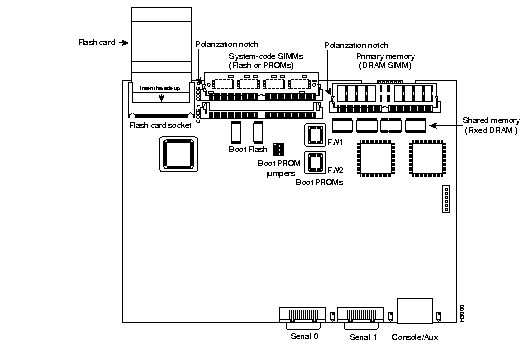
Router Components
| Component |
Location |
Description |
| Bootstrap |
stored in microcode in ROM |
Boots router and loads IOS |
| P.O.S.T. |
stored in microcode in ROM |
Checks basic functionality of router hardware and determines which
interfaces are present |
| ROM Monitor |
stored in microcode in ROM |
Used for manufacturer testing and troubleshooting |
| Mini IOS |
stored in microcode in ROM |
Also called RXBOOT or bootloader, Small IOS in ROM can be used to bring up
an interface and load a Cisco IOS into flash memory |
| RAM |
hardware |
Holds packet buffers, routing tables, software and data structures that
allow the router to function. running-config is stored in RAM. IOS can be
run from here on some routers |
| ROM |
hardware |
Used to start and maintain the router |
| Flash memory |
hardware |
Used to store the IOS. Not erased when the router is reloaded. An EEPROM
chip. |
| NVRAM |
hardware |
Used to hold router or switch configuration. Not erased when the router or
switch is reloaded. (holds startup-config) usually 32K in size. |
| Configuration Register |
in NVRAM |
Controls how the router boots |
Backing Up and Restoring Cisco IOSs
Before upgrading or restoring an IOS, you should backup the current version
to a TFTP server. By default Flash memory is used to store the Cisco IOS.
Verify Flash
   Router3>en
   Router3#show flash
   File  Length   Name/status
     1   10218508  /c2500-js-l_120-8.bin
   [10316471 bytes used, 6460745 available, 16777216 total]
   16384K bytes of processor board System flash (Read ONLY)
The last line shows the amount of flash memory on board
(16384K bytes of processor board System flash)
Filename for this IOS is c2500-js-l_120-8.bin
| Filename Explained |
| c2500 |
Platform |
| j |
Enterprise image |
| s |
File contains extended capabilities |
| l |
Indicates file may be moved, not compressed |
| 120-8 |
Revision number |
| .bin |
Executable binary file |
Backup IOS
Use the show version command to determine the version of the IOS on
the router and the filename of the image, you already got the size of flash from
the previous command.
   Router_1#show version
   ROM: System Bootstrap, Version 12.0, RELEASE SOFTWARE
   BOOTFLASH: 3000 Bootstrap Software (IGS-BOOT-R), Version 11.0(10c)XB1,
   RELEASE SOFTWARE (fc1)

   Router_1 uptime is 11 minutes
   System restarted by power-on
   System image file is c2500-js-1_120-8.bin, booted via flash

   Bridging software.
   X.25 software, Version 3.0.0.
   1 Ethernet/IEEE 802.3 interface(s)
   2 Serial network interface(s)
   32K bytes of non-volatile configuration memory.
   8192K bytes of processor board System flash (Read ONLY)

   Configuration register is 0x2102

   Router_1#
Use the following command to copy the IOS from flash to a TFTP server:
   Router3#copy flash tftp
   System flash directory:
   File  Length   Name/status
      1   6078548  c2500-js-l_120-8.bin

   [6078612 bytes used, 2309996 available, 8388608 total]
   Address or name of remote host [255.255.255.255]? 192.168.1.70
   Source file name? c2500-js-l_120-8.bin
   Destination file name [c2500-js-l_120-8.bin]?
   Verifying checksum for 'c2500-js-l_120-8.bin' (file # 1)...  OK
   Copy 'c2500-js-l_120-8.bin' from Flash to server
   as 'c2500-js-l_120-8.bin'? [yes/no]yes
   !!!!!!!!!!!!!!!!!!!!!!!!!!!!!!!!!!!!!!!!!!!!!!!!!!!!!!!
                      [cut for brevity]
   !!!!!!!!!!!!!!!!!!!!!!!!!!!!!!!!!!!!!!!!!!!!!!!!!!!!!!!

   Upload to server done
   Flash copy took 0:01:44 [hh:mm:ss]
TFTP doesn't allow directory browsing or user authentication, so the file is
put in the default directory of the TFTP server.
Restoring or Upgrading the IOS
Restoring from a TFTP server.
Make sure that file is in the TFTP's default directory (you won't be prompted
for the directory from the TFTP server, you have to know where it is).
   Router3#copy tftp flash

                            ****  NOTICE  ****
   Flash load helper v1.0
   This process will accept the copy options and then terminate
   the current system image to use the ROM based image for the copy.
   Routing functionality will not be available during that time.
   If you are logged in via telnet, this connection will terminate.
   Users with console access can see the results of the copy operation.
                            ---- ******** ----
   Proceed? [confirm]
The above tells you that the router must reboot.
   System flash directory:
   File  Length   Name/status
     1   6078548  c2500-js-l_120-8.bin

   [6078612 bytes used, 2309996 available, 8388608 total]
   Address or name of remote host [192.168.1.70]? 192.168.1.70
If you've used a TFTP server before, it will use it as the default choice.
The next prompt is for the source filename, which must be in the TFTP's root
directory.
   Source file name? c2500-js-l_120-8.bin
   Destination file name [c2500-d-l_113-5.bin]?
   Accessing file 'c2500-d-l_113-5.bin' on 192.168.1.70...
   Loading 'c2500-js-l_120-8.bin' from 192.168.1.70 (via Ethernet0): ! [OK]
Next you are prompted three times to confirm that the current flash file will
be erased, you will be prompted to backup the running-config to startup-config
if it has been changed since the router will reboot.
   Erase flash device before writing? [confirm]
   Flash contains files. Are you sure you want to erase? [confirm]

   System Configuration has been modified. Save? [yes/no]: yes
   Building configuration...
   [OK]
   Copy 'c2500-js-l_120-8.bin' from server
   as 'c2500-js-l_120-8.bin' into Flash WITH erase? [yes/no]yes
Router reboots and loads the Mini IOS from ROM in order to erase the flash
since the flash can't be erased while it's in use.
   %SYS-5-RELOAD: Reload Requested
   %FLH: c2500-js-l_120-8.bin from 192.168.1.70 to flash ...
   System flash directory:
   File  Length   Name/status
     1   6078548  c2500-js-l_120-8.bin
   [8121064 bytes used, 8656152 available, 16777216 total]
   Accessing file 'c2500-js-l_120-8.bin' on 192.168.1.70...
   Loading c2500-js-l_120-8.bin from 192.168.1.70 (via Ethernet0): ! [OK]
New file is copied
   Erasing device... eeeeeeeeeeeeeeeeeeeeeeeeeeeeeeeeeeeeeeeeeeeeeeeeeeeee
   eeeeeeeeeeeeeeeeeeeeee
   Loading c2500-js-l_120-8.bin from 192.168.1.70 (via Ethernet0):
   !!!!!!!!!!!!!!!!!!!!!!!!!!!!!!!!!!!!!!!!!!!!!!!!!!!!!!!!!!!!!!!!!!!!!!!
                           [output cut for brevity]
   !!!!!!!!!!!!!!!!!!!!!!!!!!!!!!!!!!!!!!!!!!!!!!!!!!!!!!!!!!!!!!!!!!!!!!!
After copy
   [OK 10935532/16777216 bytes]

   Verifying checksum... OK (0x2E3A)
   Flash copy took 0:05:45 [hh:mm:ss]
   %FLH: Re-booting system after download
Router reboots and new IOS is used
Reload the Router
After upgrading the IOS, you will have to reload the router to use the new
software. Note that some routers reboot automatically when you copy a new
version of software to the router if it doesn't, use the following command.
   Router_2#reload
   Proceed with reload? [confirm] yes
   %SYS-5-RELOAD: Reload requested
Backing Up and Restoring System Configuration
Any changes made to the router configuration are stored in running-config,
copying the running-config to the startup-config in NVRAM will
ensure that changes made to the system configuration are saved in the event that
the router is reloaded. Use the following command to save configuration
changes.
   Router#copy running-config startup-config
   Building configuration...
   [OK]

   Router#
Copying running-config to TFTP
Copying the running-config to a TFTP server allows you to maintain a
second copy in the event that you make irreversible errors to running-config
and startup-config. Use the following command and answer the
questions such as server's IP address and destination filename.
   Router_2#copy running-config tftp
   Remote host []? 192.168.1.70
   Name of configuration file to write [router-confg]?  < Enter >
   Write file router-confg on host 192.168.1.70? [confirm]  < Enter >
   Building configuration...
   Writing router-confg !!!!!!!!!!!!!!!!!!!!!![OK]
Restoring Configuration Files
If you've made changes to the running-config, the easiest way to
undo all of the changes is to copy the startup-config to the
running-config. Providing, of course, that you haven't saved any of
the changes you want to get rid of. If you saved changes to the
startup-config, you can load a config file from a TFTP server as long as
you remembered to back it up before making changes.
From startup
To restore the startup-config file from NVRAM
to the running-config in RAM use the following
command and note that running-config will be
overwritten with the startup-config file
information.
Router3#copy startup-config runnning-config
From TFTP
You can also restore the running-config file
from a TFTP server, providing that you have backed it up
there.
   Router_2#copy tftp running-config
   Host or network configuration file [host]? < Enter >
   Address of remote host [255.255.255.255]? 192.168.1.70
   Name of configuration file [router-confg]? router-confg
   Configure using router-confg from 192.168.1.70 [confirm]? < Enter >
   Loading router-confg from 192.168.1.70 (via serial 0)  !!!!!!
   [OK - 882/32723]
Erasing the Configuration
Use the following command to erase the startup file and enter setup mode
whenever the router is reloaded.
Router_2#erase startup-config
|
Call Now : 800-519-
2267
|
Testimonials
|
If you're serious about getting certified,
this is the place to go. Definitely worth
their competitive price. Excellent
instructors, making it possible for anyone
to learn no matter what your level of
experience or knowledge.
Michael Doty
|
 |
Vibrant
offers
MCITP MCSE
certification
training
boot camp
for $5400
all inclusive,
instructor
led at
California
and
Baltimore.
Ref1
:
Ref2
:
link
:
resources
:
Tcp/ip
MCITP MCSE CCNA CCNP Boot Camp Schedule by Vibrant
boot camps
MCITP MCSE Boot Camp Proven
MCITP MCSE Boot camp Training
for MCITP MCSE Certification Fast
MCITP
MCSE CCNA CCNP Boot Camp Schedule by
Vibrant boot camps
MCITP MCSE Boot Camp - Proven Boot camp
for MCITP MCSE at Baltimore, Maryland
MCITP MCSE Boot Camp Payment Gateway to get
MCITP MCSE
Certification Fast!
CCNA 801 Boot Camp by Vibrant boot camps,
join MCITP MCSE camps
CCNA Boot Camp by Vibrant boot camps,
join MCITP MCSE camps
CCNP Boot Camp by Vibrant boot camps,
join CCNP camps
MCITP
MCSE Boot Camp compare Vibrant boot
camps, join MCITP MCSE camps
Comptia Security+ Boot Camp by
Vibrant boot camps, join MCITP MCSE camps
MCITP MCSE Boot Camp contact Vibrant boot camps,
join MCITP MCSE camps
MCITP MCSE Boot Camp course fees Vibrant boot
camps, join MCITP MCSE camps
MCITP MCSE Boot Camp FAQ by Vibrant boot camps,
join MCITP MCSE camps
MCITP MCSE Boot Camp location by Vibrant boot
camps, join MCITP MCSE camps
MCITP MCSE Boot Camp location by Vibrant boot
camps, join MCITP MCSE camps
MCITP
MCSE Boot Camp MCITP MCSE Certification also
MCITP MCSE Training Boot Camp
MCITP
MCSE Boot Camp by Vibrant boot
camps, join MCITP MCSE camps, MCITP MCSE Cert
MCITP
MCSE Boot Camp by Vibrant boot
camps, join MCITP MCSE camps
MCITP
MCSE Boot Camp by Vibrant boot
camps, join MCITP MCSE camps
MCITP
MCSE Boot Camp by Vibrant boot
camps, join MCITP MCSE camps
MCITP MCSE Security Boot Camp MCITP MCSE
14days all_incl MCITP MCSE Certifiation boot camp
MCITP MCSE Security Boot Camp by
Vibrant boot camps, join MCITP MCSE camps
MCITP MCSE Security Boot Camp by
Vibrant boot camps, join MCITP MCSE camps
MCITP MCSE Security Boot Camp by
Vibrant boot camps, join MCITP MCSE camps
MCITP MCSE Security Boot Camp by
Vibrant boot camps, join MCITP MCSE camps
MCITP MCSE Boot Camp Payment Gateway to get
MCITP MCSE
Certification Fast!
MCITP MCSE Boot Camp Refunds
MCITP
MCSE CCNA CCNP Boot Camp Register by
Vibrant boot camps
MCITP
MCSE Boot Camp Testimonials by Vibrant
boot camps
MCITP MCSE Boot Camp Payment Gateway to get
MCITP MCSE
Certification Fast!
MCITP
MCSE Boot Camp MCITP MCSE Certification
also MCITP MCSE Training Boot Camp
Microsoft Vista
Certification Boot Camp for Vista training boot camps
MCITP MCSE CCNA CCNP Boot Camp Register by Vibrant
boot camps
MCITP
MCSE Boot Camp all inclusive bootcamp
Vibrant boot camps, join MCITP MCSE camps
MCITP
MCSE CCNA CCNP Boot Camp Register by
Vibrant boot camps
|
 MCITP Boot camp
UK
MCITP Boot camp
UK
 MCITP Camp
Thailand
MCITP Camp
Thailand
 MCITP
RHCE Boot Camp India
MCITP
RHCE Boot Camp India 


 No Prestudy