|
JOIN THE BEST
MCITP Boot Camp,
MCSE
Boot Camp also CCNA ,
CCNP Certification
Boot Camp Training program.
100% Guaranteed
- Lowest Fees, Highest
Passing Rate.
MCSE Boot Camp Certification
MCITP MCSE and CCNA Certification Notes Series :
MCSE 2016 Boot Camp
:
Azure Boot camp :
CCNA / CCNAX
Boot Camp:
CCNA Boot Camp
Cisco Hierarchical Model:
For more information about this, please read our
separate tutorial titled "The
Cisco Hierarchical Model".
OSI Model:
The OSI model is a layered model and a
conceptual standard used for defining standards
to promote multi-vendor integration as well as
maintain constant interfaces and isolate changes
of implementation to a single layer. It is NOT
application or protocol specific. In order to
pass any Cisco exam, you need to know the OSI
model inside and out.
The OSI Model consists of 7 layers as follows:
|
Layer |
Description |
Device |
Protocol |
|
Application |
Provides network access for
applications, flow control and error
recovery. Provides communications
services to applications by identifying
and establishing the availability of
other computers as well as to determine
if sufficient resources exist for
communication purposes. |
Gateway |
NCP, SMB, SMTP, FTP, SNMP, Telnet,
Appletalk |
|
Presentation |
Performs protocol conversion, encryption
and data compression |
Gateway and redirectors |
NCP, AFP, TDI |
|
Session |
Allows 2 applications to communicate
over a network by opening a session and
synchronizing the involved computers.
Handles connection establishment, data
transfer and connection release |
Gateway |
NetBios |
|
Transport |
Repackages messages into smaller
formats, provides error free delivery
and error handling functions |
Gateway |
NetBEUI, TCP, SPX, and NWLink |
|
Network |
Handles addressing, translates logical
addresses and names to physical
addresses, routing and traffic
management. |
Router and brouter |
IP, IPX, NWLink, NetBEUI |
|
**Data Link |
Packages raw bits into frames making it
transmitable across a network link and
includes a cyclical redundancy check(CRC).
It consists of the LLC sublayer and the
MAC sublayer. The MAC sublayer is
important to remember, as it is
responsible for appending the MAC
address of the next hop to the frame
header. On the contrary, LLC sublayer
uses Destination Service Access Points
and Source Service Access Points to
create links for the MAC sublayers. |
Switch, bridge and brouter |
None |
|
Physical |
Physical layer works with the physical
media for transmitting and receiving
data bits via certain encoding schemes.
It also includes specifications for
certain mechanical connection features,
such as the adaptor connector. |
Multiplexer and repeater |
None |
Here is an easy way to memorize the order of the
layers:
All People Seem To Need Data Processing.
The first letter of each word corresponds to the
first letter of one of the layers. It is a
little corny, but it works.
|
Class |
Range |
Explanation |
|
A |
1-126 |
IP addresses can be class A, B or C.
Class A addresses are for networks with
a large number of hosts. The first octet
is the netid and the 3 remaining octets
are the hostid. Class B addresses are
used in medium to large networks with
the first 2 octets making up the netid
and the remaining 2 are the hostid. A
class C is for smaller networks with the
first 3 octets making up the netid and
the last octet comprising the hostid.
The later two classes aren’t used for
networks. |
|
B |
128-191 |
|
C |
192-223 |
|
D |
224-239 (Multicasting) |
|
E |
240-255 (Experimental) |
A subnet mask blocks out a portion of an IP
address and is used to differentiate between the
hostid and netid. The default subnet masks are
as follows:
|
Class |
Default Subnet |
# of Subnets |
# of Hosts Per Subnet |
|
Class A |
255.0.0.0 |
126 |
16,777,214 |
|
Class B |
255.255.0.0 |
16,384 |
65,534 |
|
Class C |
255.255.255.0 |
2,097,152 |
254 |
In these cases, the part of the IP address
blocked out by 255 is the Net ID.
3COM’s IP addressing tutorial is
just superior. It covers basic IP addressing
options as well as subnetting and VLSM/CIDR.
IPX/SPX:
IPX will also be an important issue to consider
in network management given the fact there many
companies still use Netware servers. There are
two parts to every IPX Network address - the
Network ID and the Host ID. The first 8 hex
digits represent the network ID, while the
remaining hex digits represent the host ID,
which is most likely the same as the MAC
address, meaning we do not need to manually
assign node addresses. Note that valid
hexadecimal digits range from 0 through 9, and
hexadecimal letters range from A through F.
FFFFFFFF in hexadecimal notation = 4292967295 in
decimal.
Sequenced Packet Exchange(SPX) belongs to the
Transport layer, and is connection-oriented. It
creates virtual circuits between hosts, and that
each host is given a connection ID in the SPX
header for identifying the connection. Service
Advertisement Protocol(SAP) is used by NetWare
servers to advertise network services via
broadcast at an interval of every 60 minutes by
default.
|
Routing
Protocols RIP and IGRP
In global configuration mode enter router ? to see the available
routing protocols.
   Router3>en
   Router3#conf t
   Enter configuration commands, one per line.  End with CNTL/Z.
   Router3(config)#router ?

     bgp       Border Gateway Protocol (BGP)
     egp       Exterior Gateway Protocol (EGP)
     eigrp     Enhanced Interior Gateway Routing Protocol (EIGRP)
     igrp      Interior Gateway Routing Protocol (IGRP)
     isis      ISO IS-IS
     iso-igrp  IGRP for OSI networks
     mobile    Mobile routes
     odr       On Demand stub Routes
     ospf      Open Shortest Path First (OSPF)
     rip       Routing Information Protocol (RIP)
     static    Static routes
Routing Information Protocol (RIP)
The Routing Information Protocol (RIP) is a distance-vector protocol that
uses hop count as its metric. RIP is widely used for routing traffic in the
global Internet and is an interior gateway protocol (IGP), which means that it
performs routing within a single autonomous system. RIP only uses hop
count to determine the best route to a remote network, RIP has a maximum
hop count of 15, 16 is deemed unreachable. RIP works well in small
internetworks, but is inefficient for large networks. RIP is susceptible
to all the problems normally associated with distance vector routing protocols.
It is slow to converge and forces routers to learn network information only from
neighbors. RIP version 1 uses classful routing (all devices in the network
must use the same subnet mask because RIP version 1 doesn't send updates with
subnet information). RIP version 2 uses classless routing and does send
subnet mask information with route updates. RIP networks need the same hop
count to load balance multiple links.
Routing Updates
RIP sends its complete routing table out to all active interfaces at regular
intervals (every 30 seconds) and when the network topology changes.
When a router receives a routing update that includes changes to an entry, it
updates its routing table to reflect the new route. The metric value for
the path is increased by one, and the sender is indicated as the next hop.
RIP routers maintain only the best route (the route with the lowest metric
value) to a destination. After updating its routing table, the router
immediately begins transmitting routing updates to inform other network routers
of the change. These updates are sent independently of the regularly
scheduled updates that RIP routers send.
RIP Routing Metric
RIP uses a single routing metric (hop count) to measure the distance
between the source and a destination network. Each hop in a path from
source to destination is assigned a hop-count value, which is typically 1.
When a router receives a routing update that contains a new or changed
destination-network entry, the router adds one to the metric value indicated in
the update and enters the network in the routing table. The IP address of
the sender is used as the next hop.
RIP prevents routing loops from continuing indefinitely by implementing a
limit on the number of hops allowed in a path from the source to a destination
(15 hops). If a router receives a routing update that contains a new or
changed entry, and if increasing the metric value by one causes the metric to be
infinity (that is, 16), the network destination is considered unreachable.
Stability Features
To adjust for rapid network-topology changes, RIP specifies a number of
stability features that are common to many routing protocols. RIP, for example,
implements the split-horizon and hold-down mechanisms to prevent incorrect
routing information from being propagated. In addition, the RIP hop-count
limit prevents routing loops from continuing indefinitely.
RIP Timers
Route Update Timer - The routing-update timer clocks the interval
between periodic routing updates. It is usually set to 30 seconds.
Route Invalid TImer - The Route Invalid Timer determines the length of
time (90 seconds) before a route is considered invalid. If it doesn't receive
an update for the route it sets the route as invalid and notifies its neighbors.
Route Flush Timer - The Route Flush Timer sets the time between when a
route becomes invalid and its removal from the routing table (240
seconds). Time must be longer than invalid timer so it can tell its neighbors
about the route.
Configuring RIP
Using the sample network below, we'll enable RIP routing for the network.
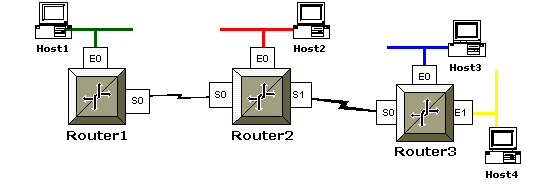
The network's configuration is as follows:
| Router |
Interface Addresses |
Network to Next Hop Router |
| Router1 |
E0 - 172.20.10.1 /24
S0 - 172.20.1.1 /24
|
Router1 to Router2
172.20.1.0/24 |
| Router2 |
E0 - 172.20.20.1 /24
S0 - 172.20.1.2 /24
S1 - 172.20.2.1 /24 |
Router2 to Router1
172.20.1.0/24
Router2 to Router3
172.20.2.0/24 |
| Router3 |
E0 - 172.20.30.1 /24
E1 - 172.20.35.1 /24
S0 - 172.20.2.2 /24
|
Router3 to Router2
172.20.2.0/24 |
Use the command router rip and tell the RIP protocol which network
to advertise (network <network #>). Routers send RIP
version 1 by default and RIP v.1 is classful, which means all the devices in the
network need to use the same subnet mask. The network is entered in using
the classful boundary and RIP will find the subnets to advertise since all the
networks are using the same subnet mask (/24). Below is the actual
configuration for the above sample network, the interface configurations are
also shown for completeness.
Router1
   Router1> enable
   Router1# configure terminal
   Enter configuration commands, one per line.  End with CNTL/Z.

   Router1(config)# interface e0
   Router1(config-if)# ip address 172.20.10.1 255.255.255.0
   Router1(config-if)# no shutdown

   Router1(config-if)# interface s0
   Router1(config-if)# ip address 172.20.1.1 255.255.255.0
   Router1(config-if)# no shutdown
   Router1(config-if)# exit

   Router1(config)# router rip
   Router1(config-router)# network 172.20.0.0
Router2
   Router2> enable
   Router2# configure terminal
   Enter configuration commands, one per line.  End with CNTL/Z.

   Router2(config)# interface e0
   Router2(config-if)# ip address 172.20.20.1 255.255.255.0
   Router2(config-if)# no shutdown

   Router2(config-if)# interface s0
   Router2(config-if)# ip address 172.20.1.2 255.255.255.0
   Router2(config-if)# no shutdown

   Router2(config-if)# interface s1
   Router2(config-if)# ip address 172.20.2.1 255.255.255.0
   Router2(config-if)# no shutdown
   Router2(config-if)# exit

   Router2(config)# router rip
   Router2(config-router)# network 172.20.0.0
Router3
   Router3> enable
   Router3# configure terminal
   Enter configuration commands, one per line.  End with CNTL/Z.

   Router3(config)# interface e0
   Router3(config-if)# ip address 172.20.30.1 255.255.255.0
   Router3(config-if)# no shutdown

   Router3(config-if)# interface e1
   Router3(config-if)# ip address 172.20.35.1 255.255.255.0
   Router3(config-if)# no shutdown

   Router3(config-if)# interface s0
   Router3(config-if)# ip address 172.20.2.2 255.255.255.0
   Router3(config-if)# no shutdown
   Router3(config-if)# exit

   Router3(config)# router rip
   Router3(config-router)# network 172.20.0.0
Viewing the routing table
You can use the show ip route command to view the router's routing
table.
   Router3#show ip route
   Codes: C - connected, S - static, I - IGRP, R - RIP, M - mobile, B - BGP
          D - EIGRP, EX - EIGRP external, O - OSPF, IA - OSPF inter area
          N1 - OSPF NSSA external type 1, N2 - OSPF NSSA external type 2
          E1 - OSPF external type 1, E2 - OSPF external type 2, E - EGP
          i - IS-IS, L1 - IS-IS level-1, L2 - IS-IS level-2, * - candidate default
          U - per-user static route, o - ODR


    Gateway of last resort is not set

        172.20.0.0/24 is subnetted, 6 subnets
   R       172.20.1.0  [120/2] via 172.20.2.1, 00:00:04, Serial0
   R       172.20.10.0  [120/2] via 172.20.2.1, 00:00:04, Serial0
   R       172.20.20.0  [120/2] via 172.20.2.1, 00:00:04, Serial0
   C       172.20.2.0 is directly connected, Serial0
   C       172.20.35.0 is directly connected, Ethernet1
   C       172.20.30.0 is directly connected, Ethernet0
Stopping RIP Propagation
Use the passive-interface command to stop RIP broadcasts from going
out an interface. The interface will still receive RIP updates, but it won't
send them on the network that the interface is connected to.
   Router3(config)# router rip
   Router3(config-router)# passive-interface serial 1
Interior Gateway Routing Protocol (IGRP)
The Interior Gateway Routing Protocol (IGRP) is a proprietary routing
protocol that was developed in the mid-1980s by Cisco Systems, Inc.
Cisco's principal goal in creating IGRP was to provide a robust protocol for
routing within an autonomous system (AS). IGRP has a maximum hop count of
255, but defaults to 100. IGRP uses bandwidth and line delay by default
for determining the best route in an internetwork (Composite Metric).
IGRP Protocol Characteristics
IGRP is a distance-vector interior gateway protocol (IGP).
Distance-vector routing protocols call for each router to send all or a portion
of its routing table in a routing-update message at regular intervals (every
90 seconds) to each of its neighboring routers. As routing information
proliferates through the network, routers can calculate distances to all nodes
within the internetwork. IGRP uses a combination (vector) of metrics.
Internetwork delay, bandwidth, reliability, and load are all factored into the
routing decision. Network administrators can set the weighting factors for
each of these metrics. IGRP uses either the administrator-set or the
default weightings to automatically calculate optimal routes.
Stability Features
IGRP provides a number of features that are designed to enhance its
stability. These include hold-downs, split horizons, and
poison-reverse updates.
Hold-downs are used to prevent regular update messages from
inappropriately reinstating a route that might have gone bad. When a
router goes down, neighboring routers detect this via the lack of regularly
scheduled update messages. These routers then calculate new routes and
send routing update messages to inform their neighbors of the route change.
This activity begins a wave of triggered updates that filter through the
network. These triggered updates do not instantly arrive at every network
device, so it is therefore possible for a device that has yet to be informed of
a network failure to send a regular update message (indicating that a route that
has just gone down is still good) to a device that has just been notified of the
network failure. In this case, the latter device would contain (and
potentially advertise) incorrect routing information. Hold-downs tell
routers to hold down any changes that might affect routes for some period of
time. The hold-down period usually is calculated to be just greater than
the period of time necessary to update the entire network with a routing change.
Split horizons derive from the premise that it is never useful to send
information about a route back in the direction from which it came.
Although hold-downs should prevent this, split horizons are implemented in IGRP
because they provide extra algorithm stability.
Split horizons should prevent routing loops between adjacent routers, but
poison-reverse updates are necessary to defeat larger routing loops.
Increases in routing metrics generally indicate routing loops.
Poison-reverse updates then are sent to remove the route and place it in
hold-down. In Cisco's implementation of IGRP, poison-reverse updates are
sent if a route metric has increased by a factor of 1.1 or greater.
IGRP Timers
Update Timer - The update timer specifies how frequently routing
update messages should be sent. The IGRP default for this variable is
90 seconds.
Invalid Timer - The invalid timer specifies how long a router should
wait, in the absence of routing-update messages about a specific route before
declaring that route invalid. The IGRP default for this variable is three
times the update period.
Hold down Timer- The hold-time variable specifies the hold-down
period. The IGRP default for this variable is three times the update timer
period plus 10 seconds.
Flush Timer - Finally, the flush timer indicates how much time should
pass before a route should be flushed from the routing table. The IGRP default
is seven times the routing update period.
Configuring IGRP
Same as RIP except you need an Autonomous System (AS) number when
specifying the routing protocol. All routers in the same Autonomous System
need the same AS in order to communicate with each other. If your network
doesn't already have an autonomous number, you are free to use any one you like.
   Router3> enable
   Router3# configure terminal
   Enter configuration commands, one per line.  End with CNTL/Z.
   Router3(config)# router igrp ?
     <1-65535>  Autonomous system number

   Router3(config)# router igrp 200
   Router3(config-router)# network 172.30.0.0
Load Balancing
To provide additional flexibility, IGRP permits multipath routing. Dual
equal-bandwidth lines can run a single stream of traffic in round-robin fashion,
with automatic switchover to the second line if one line goes down. Also,
multiple paths can be used even if the metrics for the paths are different.
If, for example, one path is three times better than another because its metric
is three times lower, the better path will be used three times as often.
Only routes with metrics that are within a certain range of the best route are
used as multiple paths. IGRP can load balance up to 6 unequal links. To
load balance IGRP over unequal links the variance command is needed to
control the load balancing between the best metric and the worst acceptable
metric.
traffic shared balanced command is used to have the routers share
inversely proportional to the metrics (i.e. balanced).
traffic shared min command tells the IGRP routing process to use routes
that have only minimum costs.
   Router3# conf t
   Enter configuration commands, one per line.  End with CNTL/Z.
   Router3(config)# router igrp 5
   Router3(config-router)# variance 20
   Router3(config-router)# traffic-share balanced
   Router3(config-router)# traffic-share min
Verifying Configurations
The show protocols command shows the network layer addresses for
each interface.
   Router1# show protocols
   Global values:
     Internet Protocol routing is enabled
   Ethernet0 is up, line protocol is up
     Internet address is 192.168.1.1/24
   Serial0 is up, line protocol is up
     Internet address is 10.128.22.1/24
   Serial1 is up, line protocol is up
     Internet address is 10.128.23.1/24
The show ip protocols command shows the routing protocols that are
configured on the router. Information includes the Autonomous System number,
routing timers, networks being advertised, gateways, and administrative
distances.
   Router1#show ip protocols

   Routing Protocol is "rip"
     Sending updates every 30 seconds, next due in 25 seconds
     Invalid after 180 seconds, hold down 180, flushed after 240
     Outgoing update filter list for all interfaces is not set
     Incoming update filter list for all interfaces is not set
     Redistributing: rip
     Default version control: send version 1, receive any version
       Interface        Send  Recv   Key-chain
       Ethernet0        1     1 2
       Serial0          1     1 2
       TokenRing0       1     1 2
     Routing for Networks:
    10.128.22.0
   Routing Information Sources:
   Gateway        Distance         Last Update
   10.128.22.3      120            00:00:03
   Distance: (default is 120)
The debug ip rip command displays routing updates as they are sent
and received to the console screen. This command places very high
processing demands on your router and could affect network performance. If you
are using telnet to configure the router, you will need to use the terminal
monitor command to see the output from debug. Turn off debugging with the
undebug all or nodebug all commands
The debug ip igrp [events || transactions] command is used to
display routing information for IGRP.
The events command shows a summary of the IGRP routing info that is
running on the network. Information about individual routers isn't shown with
this command.
The transactions command show message requests from neighbor routers
asking for updates and the broadcasts sent to them.
Turn off debugging with the undebug all or nodebug all
commands
|
 MCITP Boot camp
UK
MCITP Boot camp
UK
 MCITP Camp
Thailand
MCITP Camp
Thailand
 MCITP
RHCE Boot Camp India
MCITP
RHCE Boot Camp India 



 No Prestudy